Keycard
A Status Keycard is a JavaCard that stores a seed and signs like a Satochip. This fork supports it through a compatibility backend, so most Satochip-style flows work on a Keycard.
See also: Bundled JavaCard Applets and the Keycard notes in Smartcard integration and installation.
Requirements and setup
- The Keycard applet flashed to a JavaCard (
Keycard_v3.2.cap). - Smartcard support and KeyCard support enabled in Settings → Advanced. KeyCard support is disabled by default — turn it on before the menu appears.
-
The
keycard-cliPython compatibility layer installed. If it is not in the active environment, point SeedSigner at a checkout:export SEEDSIGNER_KEYCARD_CLI_PATH=/home/pi/keycard-cli/python # or: export SEEDSIGNER_KEYCARD_PY_PATH=... -
For a card with a custom pairing password:
export SEEDSIGNER_KEYCARD_PAIRING_PASSWORD='your-pairing-password'The Keycard menu forces the keycard backend (no auto-detection), while generic Satochip flows may fall back between backends. Override with
SEEDSIGNER_SMARTCARD_BACKEND=pysatochip|keycard|auto. - Keycard PINs are 6 digits.
The KeyCard menu
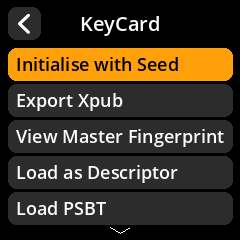
Tools → Smartcard Tools → KeyCard Functions
| Menu item | What it does |
|---|---|
| Initialise with Seed | Initialise a blank card and write a seed |
| Export Xpub | Export single-sig / multisig xpubs |
| View Master Fingerprint | Show the card’s master fingerprint |
| Load as Descriptor | Build a single-sig descriptor and open the Address Explorer |
| Load PSBT | Verify and sign a transaction |
| Change PIN | Set a new 6-digit PIN |
| Set PUK | Set the PIN-unblock key |
| Unblock PIN with PUK | Reset a blocked PIN using the PUK |
| Set Name | Give the card a friendly name |
| Remove Seed | Delete the seed from the card |
| Factory Reset Card | Wipe the card |
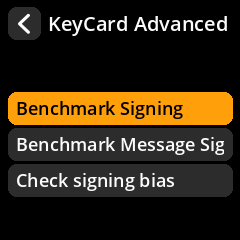
| Advanced | Benchmarks and signing-bias check |
Initialising a Keycard
- Have the seed loaded in SeedSigner.
- KeyCard Functions → Initialise with Seed.
- A blank card is initialised in-app: set a New Card PIN (6 digits, entered twice).
- Optionally set a Duress PIN. Entering the duress PIN instead of the main PIN unlocks a decoy wallet with different keys. The applet only accepts a duress PIN during initialisation — it cannot be added or changed afterwards. If you skip it, the applet defaults it to the first half of a randomly generated, unrecorded PUK.
- Choose the seed to import.
Once seeded, the same export/sign/descriptor flows as Satochip are available.
Signing and xpub export
Export Xpub, Load as Descriptor and Load PSBT behave like their Satochip counterparts: choose sig type, script type and (when enabled) BIP32 account, then scan the resulting QR into a watch-only wallet.
PIN, PUK and card management
- Change PIN sets a new 6-digit PIN.
- Set PUK / Unblock PIN with PUK manage the unblock key. If the PIN is blocked after too many wrong attempts, use the PUK to unblock it (or reset the card).
- Set Name labels the card.
- Remove Seed deletes the seed; the card can then be re-seeded.
- Factory Reset Card wipes the card completely.