Quick start 08 — BIP85 child seed
BIP85 derives child seeds from a parent seed. You back up the parent once and reproduce any child by remembering its index.
BIP-85 child seeds must be enabled in Settings → Advanced (enabled by default).
Steps
- Load the parent seed.
-
On the Seed Options screen choose BIP-85 child seed.
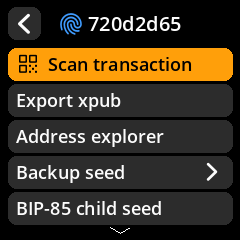
- Choose the child’s word count: 12, 18 or 24 words.
- Choose the index (0, 1, 2, …). Write the index down — you need it, with the parent seed, to reproduce the child.
- SeedSigner derives the child and shows it. You can:
- Verify/transcribe the words as a backup, or
- Finalize it into memory to use immediately.
Use the child seed
A finalized child seed works like any other seed:
- Export xpub into a watch-only wallet.
- Address explorer.
- Scan a PSBT to sign with it.
- Backup seed to words, SeedQR, or a SeedKeeper.
You do not need to back up each child separately — the parent seed plus the index is sufficient. Keep the parent seed safe: anyone who has it can reproduce every child.