Quick start 01 — Install applets on DIY JavaCards
This guide takes a blank JavaCard (for example a J3H145) and flashes the SeedKeeper applet so SeedSigner can store seeds on it. The same steps install Satochip, Satodime, Keycard, Specter-DIY and SmartPGP — only the .cap file changes.
Read Bundled JavaCard Applets first if you are unsure which applet to install. For SeedKeeper you almost certainly want
SeedKeeper-0.2-official.cap(plain) orSeedKeeper-Ndef-v0.2-0.1.cap(adds NFC tag behaviour).
What you need
- A blank or wiped JavaCard.
- A smart card reader connected to SeedSigner. A USB contact reader is the most reliable choice for flashing; NFC/contactless flashing can be less reliable.
- Smartcard support enabled (Settings → Advanced; enabled by default).
Steps
- Put the card on the reader.
-
Go to Tools → Smartcard Tools → DIY Tools.
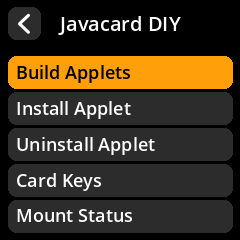
- Choose Install Applet.
-
Pick the applet:
- SeedKeeper-0.2-official.cap — normal SeedKeeper.
- SeedKeeper-Ndef-v0.2-0.1.cap — SeedKeeper plus NDEF (tap-to-open-app).
-
If you picked a SeedKeeper build, choose the storage size. 8 KB is the default and is plenty for most users:
Size Notes 4 KB Only if you must; very few secrets 8 KB Recommended default 16 / 32 / 64 KB For many seeds/descriptors - Wait for the success screen. The card now has the applet.
Verify the applet
-
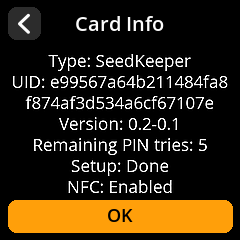
Go to Tools → Smartcard Tools → SeedKeeper Functions → Card Settings → Card Info.
-
Confirm the Type is
SeedKeeperand the Version is0.2-0.1.Both applet v0.1 and v0.2 report applet version 0.1. The protocol minor version is the real discriminator (v0.1 →
0.1, v0.2 →0.2). If you see0.1, you flashed the legacy v0.1 build.
First use: set a PIN
The first SeedKeeper operation asks you to set a New Card PIN (entered twice). Keep it safe — there is no PIN recovery.
If something goes wrong
- “No smartcard detected” — re-seat the card, check the reader, or try the other reader type. On NFC, move the card slower/closer.
- Install fails on a contactless reader — try a USB contact reader.
- You locked the card with custom GlobalPlatform keys — see Quick start 06 — First-time DIY card setup.
- A full SeedKeeper v0.1 cannot be freed by deleting secrets — re-flash the v0.2 applet. See SeedKeeper v0.1.