Quick start 03 — Load a multisig descriptor and save it to a SeedKeeper
A wallet descriptor tells SeedSigner exactly what a multisig wallet looks like. Being able to store it on a SeedKeeper means you can rebuild the wallet’s view (and its Address Explorer) on any SeedSigner without re-scanning the descriptor from your computer every time.
What you need
- A SeedKeeper card with the applet installed (Quick start 01).
- A descriptor exported from your coordinator (Sparrow, Specter Desktop, Nunchuk, …) as a QR code.
Part 1 — Load the descriptor
- In your coordinator, export the wallet descriptor as a QR code.
- On SeedSigner, either scan it from the Scan flow, or go to Tools → Address explorer → Scan wallet descriptor.
- If loading from a card instead, see Part 3.
- Review the descriptor summary: the multisig policy (e.g.
2 of 3) and the key fingerprints.
Part 2 — Save the descriptor to the SeedKeeper
- With the descriptor loaded, go to Tools → Smartcard Tools → SeedKeeper Functions → Save MultiSig Descriptor.
- Enter a Descriptor Label (e.g.
family-2of3). - Wait for the success screen (
Multisig Descriptor Exported).
On a SeedKeeper v0.2 card the descriptor is stored as one secret. On an older v0.1 card SeedSigner splits it into an msig_desc_… template plus an xpub_… entry per key and reassembles it on load. It only writes secrets that are not already present.
Part 3 — Load the descriptor back
-
Go to Tools → Smartcard Tools → SeedKeeper Functions → Load MultiSig Descriptor.
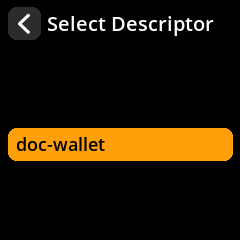
- Pick your descriptor.
- You land on the descriptor summary.
Part 4 — Use it in the Address Explorer
- From the descriptor summary choose Address explorer.
- Choose Receive addresses or Change addresses.
- Compare the addresses to your coordinator. If they match, the descriptor is correct and the wallet is set up consistently.
The loaded descriptor also stays available to the Address Explorer until you clear it with Tools → Clear Multisig Descriptor.