Password Generator
The Password Generator produces deterministic-length, high-entropy passwords and passphrases, optionally using physical entropy (camera or dice). It is under Tools → Password Generator.
The generator never stores anything by itself. You can write a result down, show it as a QR code, or save it to a SeedKeeper smartcard.
Use this for passwords and passphrases that need a backup you control. For a BIP-39 wallet seed, use the seed flows instead.
Choosing a type
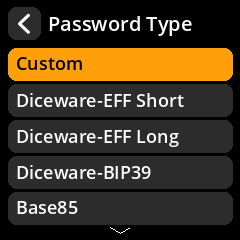
| Type | What you get |
|---|---|
| Custom | A random string with your choice of character sets |
| Diceware-EFF Short | EFF short wordlist passphrase (fewer, longer words) |
| Diceware-EFF Long | EFF long wordlist passphrase |
| Diceware-BIP39 | A passphrase built from the BIP-39 wordlist |
| Base85 / Base64 / Hex | Random strings in the chosen alphabet |
| Dice Rolls | A password derived directly from dice rolls you enter |
For word-based types you next choose a strength (64 / 128 / 256 bits) and a word separator (None, Capitalise, Space, .). For Custom you also choose which character sets to include.
Choosing an entropy source
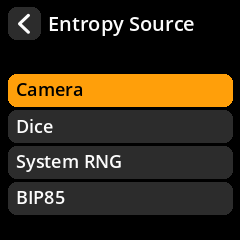
| Source | Notes |
|---|---|
| System RNG | The device’s hardware/OS random number generator |
| Camera | Entropy from camera sensor noise |
| Dice | Entropy from rolls you enter (6 / 10 / 20-sided dice) |
| BIP85 | Deterministically derive the password from a loaded seed |
The System RNG is health-monitored in the background. If the RNG monitor has flagged the source as unhealthy, password generation fails closed with a System RNG Error rather than producing a weak password. Camera/dice sources are the fallback when you want physical entropy.
BIP85 is only offered for password types it supports (word/hex-style outputs); other types show a warning that BIP85 is unavailable for them.
Dice rolls
If you choose Dice, you are asked for the number of sides and the number of rolls, then enter the rolls one at a time. The app displays a running entropy-quality indicator. Use real dice; the quality of the result depends on the rolls.
Camera
Camera entropy shows a live entropy-quality readout while it samples. Move the camera over a varied, well-lit scene to collect quality entropy.
Reviewing and saving
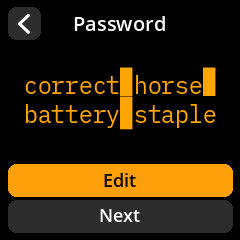
The review screen shows the generated password. From here:
- Show as QR displays the password as a QR code (handy for transferring to another device you trust).
- Save to Seedkeeper writes the password to a SeedKeeper card.
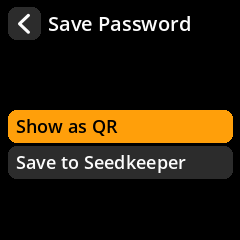
When saving to a SeedKeeper you enter a Password Name (the label) and the secret is stored as a generic secret. You can read it back later from SeedKeeper Functions → View Secrets on Card.
Back up important passwords. A password that only exists on a card is lost if the card is lost. Write down recovery copies deliberately; do not rely on a single SeedKeeper as the only copy.