Quick start 07 — SLIP-39 backup
SLIP-39 splits a seed into shares; a threshold of shares is needed to rebuild it. This guide creates a 2-of-3 backup and stores shares on SeedKeeper cards.
SLIP-39 is disabled by default. Enable SLIP-39 seeds in Settings → Advanced first. Enable Extendable SLIP-39 shares if you plan to extend the backup later.
Part 1 — Create the shares
-
Go to Tools and choose SLIP39 seed (camera) or SLIP39 seed (dice).
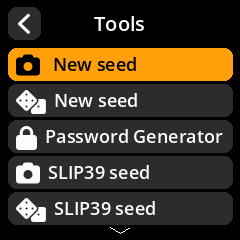
- Choose the word length (20 or 33 words) and the share configuration. For a simple
2 of 3, choose 3 shares with a threshold of 2. - Generate entropy and write down the shares, or continue to store them.
Part 2 — Store shares on a SeedKeeper
There are two ways:
- From the generation flow — after the shares are generated, save each one to a card in turn.
- From a loaded SLIP-39 seed — load the seed (see below), then Seed Options → Backup seed → To SeedKeeper and pick which share to store.
SeedSigner stores each share as its own labelled secret (SLIP39:<label>). A single share is useless on its own, so distributing shares across cards/locations is the point.
Part 3 — Recombine the shares
- Seeds → Load a seed → SLIP-39 Shares.
- Enter shares until the threshold is met. You can enter them from any mix of:
- Text — type the words.
- QR — scan a share QR.
- SeedKeeper — load a stored share.
- SeedSigner reconstructs the seed and shows its fingerprint.
Part 4 — Optional: seed a Satochip from the result
With the recombined seed in memory, use Satochip Functions → Initialise with Seed and pick the seed (or SLIP-39 Shares). See Quick start 04.